
One Prompt, Jira and Confluence Both Move
Every team I've watched use Jira and Confluence does the same thing. They open a Jira tab, scroll through their board, switch to Confluence, skim a page, tab back to Jira, copy a ticket key, tab to Confluence again, paste it into a new page.
The pattern is so common that Atlassian shipped a "Confluence page from Jira issue" button to paper over it. It helps. It also doesn't change the underlying shape of the work: you are the integration.
The Atlassian connector is about not being that anymore.
What's in it
Two services, one OAuth flow:
- Jira: search with JQL, read/create/update issues, transition workflow states, manage comments and attachments, look up users
- Confluence: search with CQL, list/read/create/edit pages, manage comments and attachments
Both are scoped to whichever Atlassian site you connect. You can connect more than one. See the Jira and Confluence docs for the full tool surface.
The interesting part isn't the individual tools. It's what happens when an AI assistant has both at the same time.
The standup prep workflow
Monday morning, 8:55am. Standup at 9:00. What have you been working on?
Here's the prompt I actually use:
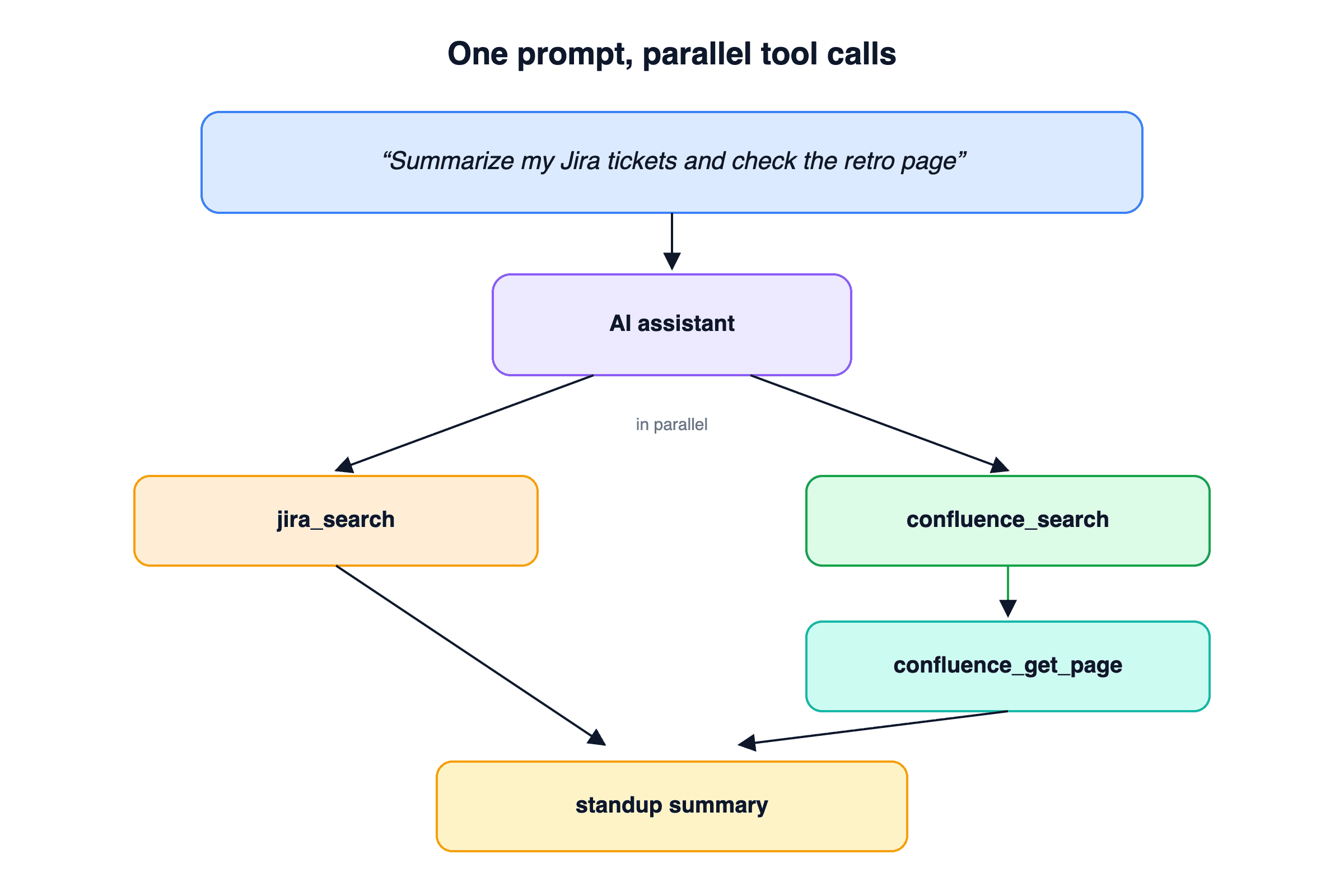
"Summarize my Jira tickets that moved this week, then check if the sprint retro page on Confluence has any action items assigned to me."
Under the hood, the assistant runs:
jira_searchwithassignee = currentUser() AND updated >= -7d ORDER BY updated DESCand pulls the recent issuesconfluence_searchwith a CQL query for the retro page in the current sprint's spaceconfluence_get_pageon the match, scanning the page for mentions of my name in action-item tables- Writes a paragraph summary
I don't write JQL. I don't write CQL. I describe the outcome. The assistant figures out which query languages to use, runs them in parallel where it can, and hands back the one thing I wanted: three bullets for standup.
The ticket-from-context workflow
A customer sends a long email describing a bug. You want a Jira ticket.
The old flow: read the email, mentally extract steps to reproduce, open Jira, click New Issue, copy-paste fragments, format them, set the priority, assign it.
The new flow is one prompt: "Create a Jira bug in the PLATFORM project from this email with steps to reproduce and assign it to Sarah."
The assistant calls jira_search_users to resolve "Sarah" to an account ID, calls jira_create_issue with a structured description built from the email body, and returns the issue key and URL. If Sarah has a common first name and there are three Sarahs, the assistant asks which one. That's the only human decision in the loop.
The retro-to-tickets workflow
End of sprint. Your team ran a retro on a Confluence page with an "Action Items" table at the bottom. Normally someone has to manually create a Jira ticket for each action item.
"Read the Q2 W4 retro page and create Jira tickets for every action item in the Improvements section. Assign each one to the owner listed in the row."
confluence_search, confluence_get_page, a loop of jira_search_users + jira_create_issue, and the assistant replies with a list of created issue keys. A meeting artifact becomes work items in roughly the time it takes to read this paragraph.
The status-doc workflow
The reverse direction is just as useful. You've been closing tickets all week. You need a status update for a stakeholder.
"Pull my closed Jira tickets from the last 7 days, group them by epic, and write a status update as a new Confluence page under the Weekly Updates parent."
This one hits every corner of the connector. jira_search for the tickets, jira_get_issue to fetch epic links, confluence_search to locate the parent page ID, confluence_create_page to write the summary in storage format. The output is a page URL you can paste into Slack.
The payoff isn't speed (though it's faster). It's that this kind of cross-product work is low-priority enough that it often just doesn't get done. Teams don't write status pages because writing status pages is annoying. When the cost drops to a sentence, the pages start showing up.
Why JQL and CQL stop mattering
I've worked with a lot of engineers who treat JQL like a dark art. "How do I find tickets that were in progress at any point last week but aren't assigned to me anymore?" Most people open the Jira UI and fight the filter builder for ten minutes.
The query is:
status WAS "In Progress" DURING (startOfWeek(-1w), endOfWeek(-1w))
  AND assignee != currentUser()
Your AI assistant knows this. It's been writing JQL since it was a thing. The same goes for CQL on Confluence, which is even more obscure. The assistant will write queries that most humans would have to look up. That's a real productivity lift for anyone who touches Jira occasionally but doesn't live in it.
Context, not content
A quick aside on the technical side. Confluence pages are stored as XHTML in a format Atlassian calls storage format. A two-page meeting-notes page with a table and some status badges easily runs 40KB of markup. Most of that is structural: macros, layout wrappers, text style runs, panel containers.
An AI assistant doesn't need any of it. It needs the words.
We wrote about this problem and how we solve it in a previous post. The short version: the connector converts storage format to clean text before it ever touches your context window. 40KB of XHTML becomes 2KB of markdown. That's what makes the "read 10 retro pages and summarize" kind of workflow actually work.
Connecting
Sign in at datatorag.com/dashboard, click Connect on the Atlassian card, pick your site, approve the OAuth scopes. Both Jira and Confluence come online together.
If you have multiple Atlassian sites (common in companies with a few acquisitions), you can connect more than one and specify which to use per call. The multi-account post covers how that works under the hood.
Then try this as your first prompt: "What are my open Jira tickets and when was each last updated?" If your tickets are anything like mine, you'll get a surprise.
Related articles
Confluence storage format is verbose XML that destroys context windows. We convert it to clean text by default, with a format switch for when you need the raw markup back.
AI-Powered Email Workflows with the Gmail Draft ToolMost AI email tools generate and send in one shot. We built a draft workflow instead, because anything that matters deserves a second look before it leaves your outbox.
Claude Can Draft Your Email. It Can't Send It.The native Claude Gmail connector writes drafts into your Drafts folder and stops there. DataToRAG fills the gap: send, reply, forward, label.